> ## Documentation Index
> Fetch the complete documentation index at: https://docs-dev-feat-member-mgmt-docs.mintlify.site/llms.txt
> Use this file to discover all available pages before exploring further.

> Learn how to configure an update policy form using Forms for Actions for users to review and accept new terms of service or consent updates.

# Use Cases: Configure an update policy form using Forms

<Card title="Before you start">
  1. Create a [Machine-to-Machine Application](/docs/get-started/auth0-overview/create-applications/machine-to-machine-apps) with the following scopes enabled:

  * `read:users`
  * `update:users`
  * `create:users`
  * `read:users_app_metadata`
  * `update:users_app_metadata`
  * `create:users_app_metadata`

  2. Add a [Vault connection](/docs/customize/forms/vault) using the M2M application credentials.
</Card>

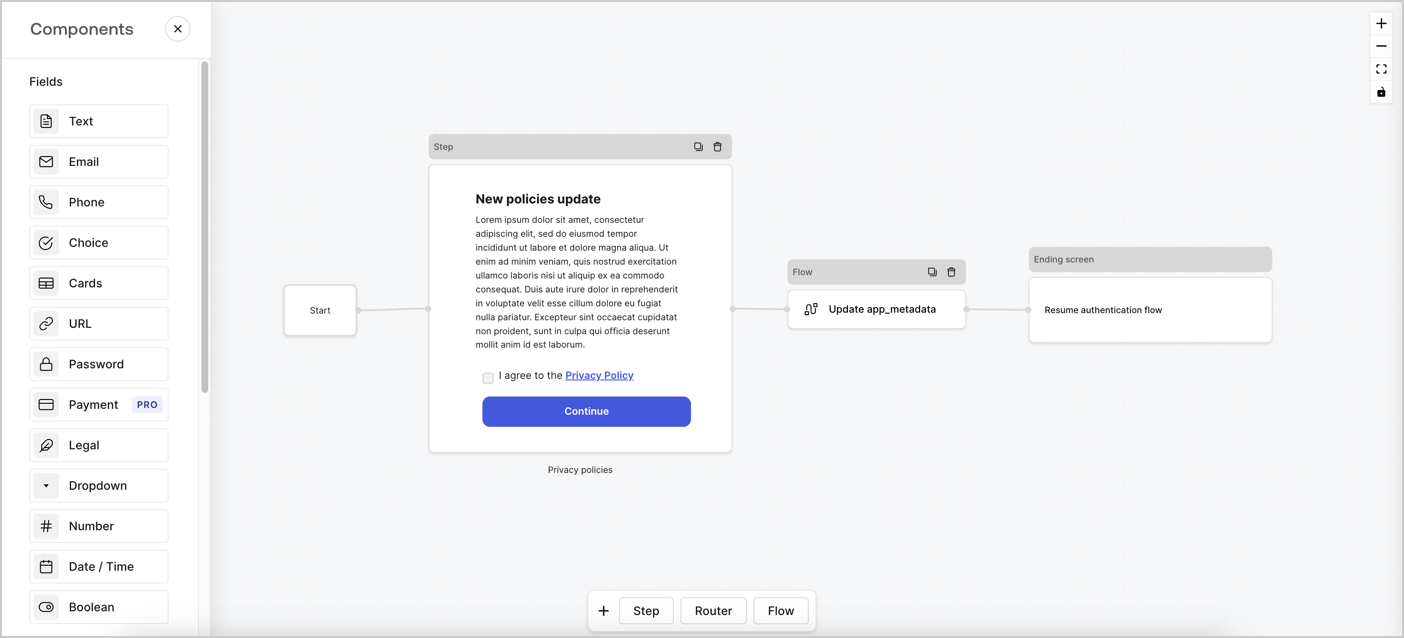
Forms for Actions allows you to create custom privacy policies flows and store the consent under the `app_metadata` object.
<Frame>
  <img src="https://mintcdn.com/docs-dev-feat-member-mgmt-docs/VCDS0z57gDgUQAvM/docs/images/cdy7uua7fh8z/6i68dMvHDTijfRmSgN1x8Q/ad900e7d4c0fb34645921435472b8684/privavy-policy-form.png?fit=max&auto=format&n=VCDS0z57gDgUQAvM&q=85&s=d99704399390117bc13ad5769927ea91" alt="Dashboard > Actions > Forms > Privacy policy use case" data-og-width="1404" width="1404" data-og-height="638" height="638" data-path="docs/images/cdy7uua7fh8z/6i68dMvHDTijfRmSgN1x8Q/ad900e7d4c0fb34645921435472b8684/privavy-policy-form.png" data-optimize="true" data-opv="3" srcset="https://mintcdn.com/docs-dev-feat-member-mgmt-docs/VCDS0z57gDgUQAvM/docs/images/cdy7uua7fh8z/6i68dMvHDTijfRmSgN1x8Q/ad900e7d4c0fb34645921435472b8684/privavy-policy-form.png?w=280&fit=max&auto=format&n=VCDS0z57gDgUQAvM&q=85&s=4b609125cdbabfcd56408790ccaf5cc0 280w, https://mintcdn.com/docs-dev-feat-member-mgmt-docs/VCDS0z57gDgUQAvM/docs/images/cdy7uua7fh8z/6i68dMvHDTijfRmSgN1x8Q/ad900e7d4c0fb34645921435472b8684/privavy-policy-form.png?w=560&fit=max&auto=format&n=VCDS0z57gDgUQAvM&q=85&s=153017be920575034c8c2e3768c44654 560w, https://mintcdn.com/docs-dev-feat-member-mgmt-docs/VCDS0z57gDgUQAvM/docs/images/cdy7uua7fh8z/6i68dMvHDTijfRmSgN1x8Q/ad900e7d4c0fb34645921435472b8684/privavy-policy-form.png?w=840&fit=max&auto=format&n=VCDS0z57gDgUQAvM&q=85&s=df40703c95e74c9ee75fc0b8fc806560 840w, https://mintcdn.com/docs-dev-feat-member-mgmt-docs/VCDS0z57gDgUQAvM/docs/images/cdy7uua7fh8z/6i68dMvHDTijfRmSgN1x8Q/ad900e7d4c0fb34645921435472b8684/privavy-policy-form.png?w=1100&fit=max&auto=format&n=VCDS0z57gDgUQAvM&q=85&s=7ed6a97d09deb9e3305248a3bf9e45ba 1100w, https://mintcdn.com/docs-dev-feat-member-mgmt-docs/VCDS0z57gDgUQAvM/docs/images/cdy7uua7fh8z/6i68dMvHDTijfRmSgN1x8Q/ad900e7d4c0fb34645921435472b8684/privavy-policy-form.png?w=1650&fit=max&auto=format&n=VCDS0z57gDgUQAvM&q=85&s=dea7032116130e0a1aad20bd50169e1f 1650w, https://mintcdn.com/docs-dev-feat-member-mgmt-docs/VCDS0z57gDgUQAvM/docs/images/cdy7uua7fh8z/6i68dMvHDTijfRmSgN1x8Q/ad900e7d4c0fb34645921435472b8684/privavy-policy-form.png?w=2500&fit=max&auto=format&n=VCDS0z57gDgUQAvM&q=85&s=7cc4089a9b8e12d09e69d217e525c170 2500w" />
</Frame>

The sections below outline how you can create an Update Policy form using nodes and flows, along with steps for adding your form to a [Post Login](/docs/customize/actions/explore-triggers/signup-and-login-triggers/login-trigger) Action.

## Create a form from scratch

Follow these steps to create a form to gather information:

1. Open the Form editor by selecting **Auth0 Dashboard > Actions > Forms.**
2. Select **Create Form** > **Start from scratch**.

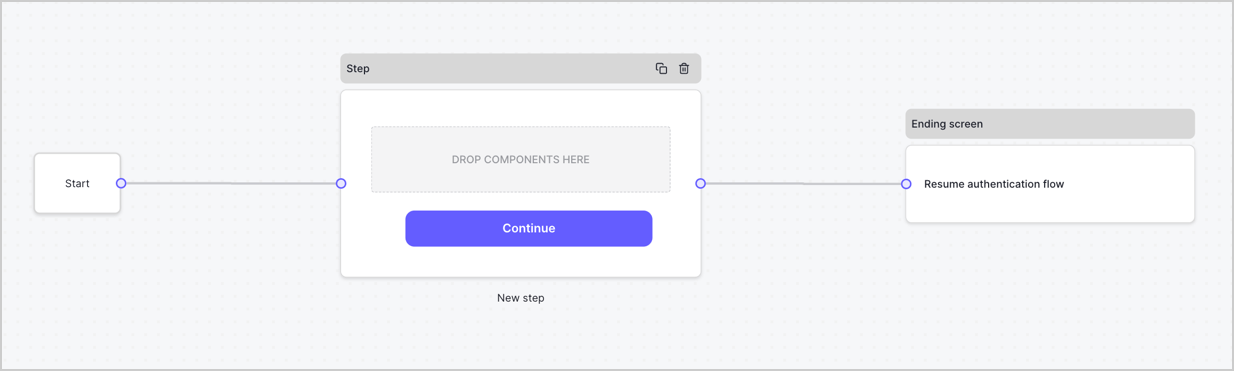
By default, a new form contains a Start node, a Step node, and an Ending screen node.
<Frame>
  <img src="https://mintcdn.com/docs-dev-feat-member-mgmt-docs/4n7iYhspOux24HQf/docs/images/cdy7uua7fh8z/2TZ9jSjgEcARFpULI6hz4R/a4319a1bd482f2ee5cc23100fdb2f42c/New-form-Forms-for-action-use-case.png?fit=max&auto=format&n=4n7iYhspOux24HQf&q=85&s=9381d643a699c2a8f250dc41a1af2a51" alt="Dashboard > Forms > Use Cases > Form" data-og-width="1234" width="1234" data-og-height="371" height="371" data-path="docs/images/cdy7uua7fh8z/2TZ9jSjgEcARFpULI6hz4R/a4319a1bd482f2ee5cc23100fdb2f42c/New-form-Forms-for-action-use-case.png" data-optimize="true" data-opv="3" srcset="https://mintcdn.com/docs-dev-feat-member-mgmt-docs/4n7iYhspOux24HQf/docs/images/cdy7uua7fh8z/2TZ9jSjgEcARFpULI6hz4R/a4319a1bd482f2ee5cc23100fdb2f42c/New-form-Forms-for-action-use-case.png?w=280&fit=max&auto=format&n=4n7iYhspOux24HQf&q=85&s=2e02f1758c1a4db943b50554c66306fd 280w, https://mintcdn.com/docs-dev-feat-member-mgmt-docs/4n7iYhspOux24HQf/docs/images/cdy7uua7fh8z/2TZ9jSjgEcARFpULI6hz4R/a4319a1bd482f2ee5cc23100fdb2f42c/New-form-Forms-for-action-use-case.png?w=560&fit=max&auto=format&n=4n7iYhspOux24HQf&q=85&s=2cc1b8a8934e35141ba75e8006d2aa38 560w, https://mintcdn.com/docs-dev-feat-member-mgmt-docs/4n7iYhspOux24HQf/docs/images/cdy7uua7fh8z/2TZ9jSjgEcARFpULI6hz4R/a4319a1bd482f2ee5cc23100fdb2f42c/New-form-Forms-for-action-use-case.png?w=840&fit=max&auto=format&n=4n7iYhspOux24HQf&q=85&s=2b4235a54074fa1c19c32e9afb628967 840w, https://mintcdn.com/docs-dev-feat-member-mgmt-docs/4n7iYhspOux24HQf/docs/images/cdy7uua7fh8z/2TZ9jSjgEcARFpULI6hz4R/a4319a1bd482f2ee5cc23100fdb2f42c/New-form-Forms-for-action-use-case.png?w=1100&fit=max&auto=format&n=4n7iYhspOux24HQf&q=85&s=77cbe7c3ee16c11855356be4865e9069 1100w, https://mintcdn.com/docs-dev-feat-member-mgmt-docs/4n7iYhspOux24HQf/docs/images/cdy7uua7fh8z/2TZ9jSjgEcARFpULI6hz4R/a4319a1bd482f2ee5cc23100fdb2f42c/New-form-Forms-for-action-use-case.png?w=1650&fit=max&auto=format&n=4n7iYhspOux24HQf&q=85&s=35457929e9effa49a7449573b19a7c24 1650w, https://mintcdn.com/docs-dev-feat-member-mgmt-docs/4n7iYhspOux24HQf/docs/images/cdy7uua7fh8z/2TZ9jSjgEcARFpULI6hz4R/a4319a1bd482f2ee5cc23100fdb2f42c/New-form-Forms-for-action-use-case.png?w=2500&fit=max&auto=format&n=4n7iYhspOux24HQf&q=85&s=b9ae31f21a4d572ac49413a164c8a5f1 2500w" />
</Frame>

### Configure the Step node

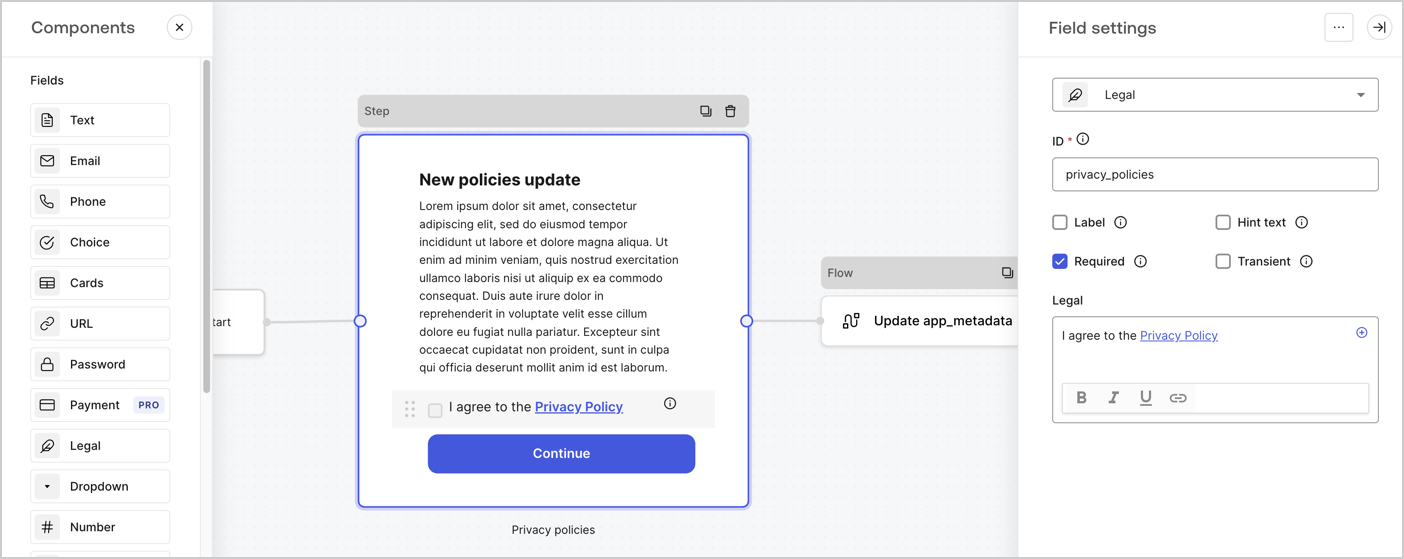
The Step node is the graphical interface visible to users. Add [Fields](/docs/customize/forms/nodes-and-components) to the Step node to collect the new agreement acceptance value by following these steps:

1. Drag a **Rich text** field from the **Components menu** into the **Step** node.

   * **Rich text**: Enter a description of your privacy policies updates.
   * Select **Save**.
2. Drag a **Legal** field into the **Step** node.

   * **ID**: Enter `privacy_policies`.
   * **Required**: Enable the checkbox.
   * **Legal**: Enter `I agree to the Privacy Policy`.
   * Select **Save**.
3. Select **Publish** to save.
<Frame>
  <img src="https://mintcdn.com/docs-dev-feat-member-mgmt-docs/-MhMFe-cTVd0bbdB/docs/images/cdy7uua7fh8z/59zFFjQjAnjogkc2QGIqqJ/0ad66b1b636544122aa4e65968b76c2c/privacy-policy-step-node.png?fit=max&auto=format&n=-MhMFe-cTVd0bbdB&q=85&s=cf086fc292118a409b8bbb00299c4c38" alt="Dashboard > Actions > Forms > Use case privacy policy step node" data-og-width="1404" width="1404" data-og-height="559" height="559" data-path="docs/images/cdy7uua7fh8z/59zFFjQjAnjogkc2QGIqqJ/0ad66b1b636544122aa4e65968b76c2c/privacy-policy-step-node.png" data-optimize="true" data-opv="3" srcset="https://mintcdn.com/docs-dev-feat-member-mgmt-docs/-MhMFe-cTVd0bbdB/docs/images/cdy7uua7fh8z/59zFFjQjAnjogkc2QGIqqJ/0ad66b1b636544122aa4e65968b76c2c/privacy-policy-step-node.png?w=280&fit=max&auto=format&n=-MhMFe-cTVd0bbdB&q=85&s=f91d4d6d3ac9bb079d8f12bf4d9846e7 280w, https://mintcdn.com/docs-dev-feat-member-mgmt-docs/-MhMFe-cTVd0bbdB/docs/images/cdy7uua7fh8z/59zFFjQjAnjogkc2QGIqqJ/0ad66b1b636544122aa4e65968b76c2c/privacy-policy-step-node.png?w=560&fit=max&auto=format&n=-MhMFe-cTVd0bbdB&q=85&s=84cdb5b1328f3c4d82913358d714195e 560w, https://mintcdn.com/docs-dev-feat-member-mgmt-docs/-MhMFe-cTVd0bbdB/docs/images/cdy7uua7fh8z/59zFFjQjAnjogkc2QGIqqJ/0ad66b1b636544122aa4e65968b76c2c/privacy-policy-step-node.png?w=840&fit=max&auto=format&n=-MhMFe-cTVd0bbdB&q=85&s=222286153dbacca044b40917be54e414 840w, https://mintcdn.com/docs-dev-feat-member-mgmt-docs/-MhMFe-cTVd0bbdB/docs/images/cdy7uua7fh8z/59zFFjQjAnjogkc2QGIqqJ/0ad66b1b636544122aa4e65968b76c2c/privacy-policy-step-node.png?w=1100&fit=max&auto=format&n=-MhMFe-cTVd0bbdB&q=85&s=76a3714eb432b002be9e8490fb233219 1100w, https://mintcdn.com/docs-dev-feat-member-mgmt-docs/-MhMFe-cTVd0bbdB/docs/images/cdy7uua7fh8z/59zFFjQjAnjogkc2QGIqqJ/0ad66b1b636544122aa4e65968b76c2c/privacy-policy-step-node.png?w=1650&fit=max&auto=format&n=-MhMFe-cTVd0bbdB&q=85&s=f59774cc17a286f3883c6154940e474f 1650w, https://mintcdn.com/docs-dev-feat-member-mgmt-docs/-MhMFe-cTVd0bbdB/docs/images/cdy7uua7fh8z/59zFFjQjAnjogkc2QGIqqJ/0ad66b1b636544122aa4e65968b76c2c/privacy-policy-step-node.png?w=2500&fit=max&auto=format&n=-MhMFe-cTVd0bbdB&q=85&s=e9f0b137ab4c55bde79d65df4a7b82af 2500w" />
</Frame>

### Configure the Flow node

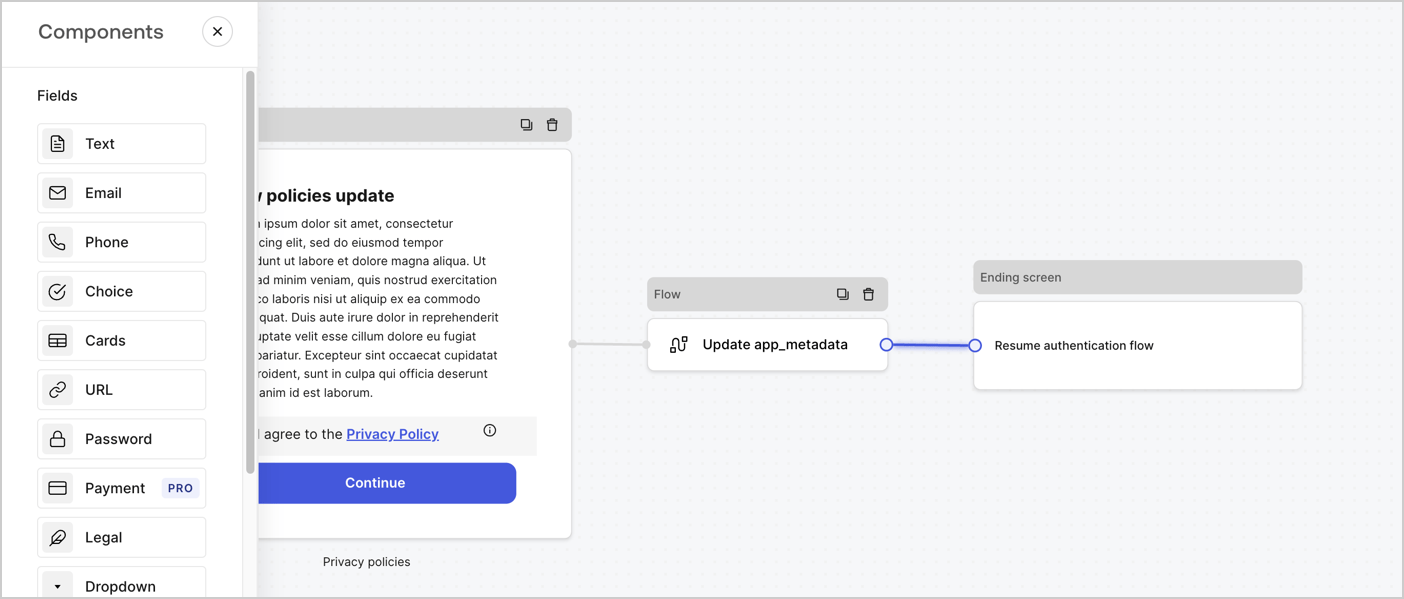
Add a **Flow** node after the **Step** node to update the `app_metadata` and resume the authentication flow by following these steps:

1. Select **Flow** from the bottom of the Form editor.
2. Remove the existing link between the **Step** and **Ending Screen** nodes.
3. Select the new **Flow** > **Click to add a flow** > **Create a new flow.**

   * Enter `Update app_metadata` in the **Name** field.
   * Select **Create**.
   * Select **Save**.
4. Link the **Flow** node to the **Step** and **Ending Screen** nodes as pictured below.
5. Select **Publish** to save.
<Frame>
  <img src="https://mintcdn.com/docs-dev-feat-member-mgmt-docs/VCDS0z57gDgUQAvM/docs/images/cdy7uua7fh8z/6YIkzm7SrpM9LW76AXuRzh/353c518fe82bbaa440836da1d83596d6/link-policies.png?fit=max&auto=format&n=VCDS0z57gDgUQAvM&q=85&s=ec20c29daa1f0f0beddcfa6cb26fd082" alt="Dashboard > Actions > Forms > Form" data-og-width="1404" width="1404" data-og-height="599" height="599" data-path="docs/images/cdy7uua7fh8z/6YIkzm7SrpM9LW76AXuRzh/353c518fe82bbaa440836da1d83596d6/link-policies.png" data-optimize="true" data-opv="3" srcset="https://mintcdn.com/docs-dev-feat-member-mgmt-docs/VCDS0z57gDgUQAvM/docs/images/cdy7uua7fh8z/6YIkzm7SrpM9LW76AXuRzh/353c518fe82bbaa440836da1d83596d6/link-policies.png?w=280&fit=max&auto=format&n=VCDS0z57gDgUQAvM&q=85&s=d012cfd6d05abf30ff53fdfd25b403d1 280w, https://mintcdn.com/docs-dev-feat-member-mgmt-docs/VCDS0z57gDgUQAvM/docs/images/cdy7uua7fh8z/6YIkzm7SrpM9LW76AXuRzh/353c518fe82bbaa440836da1d83596d6/link-policies.png?w=560&fit=max&auto=format&n=VCDS0z57gDgUQAvM&q=85&s=9db7860910b387e76930fa57bcdbf34d 560w, https://mintcdn.com/docs-dev-feat-member-mgmt-docs/VCDS0z57gDgUQAvM/docs/images/cdy7uua7fh8z/6YIkzm7SrpM9LW76AXuRzh/353c518fe82bbaa440836da1d83596d6/link-policies.png?w=840&fit=max&auto=format&n=VCDS0z57gDgUQAvM&q=85&s=5f997d081a27fd5873739b87be4fc79f 840w, https://mintcdn.com/docs-dev-feat-member-mgmt-docs/VCDS0z57gDgUQAvM/docs/images/cdy7uua7fh8z/6YIkzm7SrpM9LW76AXuRzh/353c518fe82bbaa440836da1d83596d6/link-policies.png?w=1100&fit=max&auto=format&n=VCDS0z57gDgUQAvM&q=85&s=b5ca0f803a9e50f4b79dfdd75bbc3d74 1100w, https://mintcdn.com/docs-dev-feat-member-mgmt-docs/VCDS0z57gDgUQAvM/docs/images/cdy7uua7fh8z/6YIkzm7SrpM9LW76AXuRzh/353c518fe82bbaa440836da1d83596d6/link-policies.png?w=1650&fit=max&auto=format&n=VCDS0z57gDgUQAvM&q=85&s=151a78223e6b525db5a32a16bd46adac 1650w, https://mintcdn.com/docs-dev-feat-member-mgmt-docs/VCDS0z57gDgUQAvM/docs/images/cdy7uua7fh8z/6YIkzm7SrpM9LW76AXuRzh/353c518fe82bbaa440836da1d83596d6/link-policies.png?w=2500&fit=max&auto=format&n=VCDS0z57gDgUQAvM&q=85&s=f918ad840acdf8e670aa4e4f7f89e95b 2500w" />
</Frame>

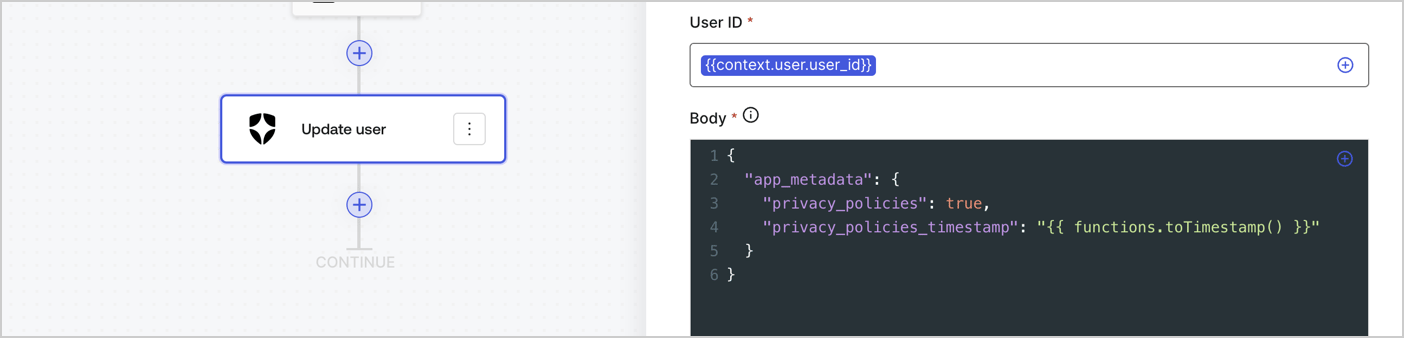
Add an Auth0 Update user action to the flow by following these steps:

1. Select the **Flow** **Update app\_metadata** > **Edit flow** to open the Flow editor in a new tab.
2. Below the StartAction, select the **+** icon to add an **Update user** action. Complete the fields below, then select **Save** to continue.

   * **Connection**: Select from the dropdown the Vault connection to your M2M application.

   * **User ID**: Enter `{{context.user.user_id}}`.

   * **Body**: Copy and paste the following code to update the app\_metadata with the privacy\_policies and privacy\_policies\_timestamp properties.

     ```text lines theme={null}
     {
       "app_metadata": {
         "privacy_policies": true,
         "privacy_policies_timestamp": "{{ functions.toTimestamp() }}"
       }
     }
     ```

   * Select **Save**.
3. Select **Publish** to save.
<Frame>
  <img src="https://mintcdn.com/docs-dev-feat-member-mgmt-docs/-xfmx525ztHoB_Qz/docs/images/cdy7uua7fh8z/CvMNIwWrOUwaFW4X3G28p/1fb70ae57a20749d9ffaaba8dc0b7e26/update-user-privacy.png?fit=max&auto=format&n=-xfmx525ztHoB_Qz&q=85&s=49c8a516991a830e8b518fee82d5e00a" alt="Dashboard > Actions > Forms > User case privacy policy code" data-og-width="1404" width="1404" data-og-height="338" height="338" data-path="docs/images/cdy7uua7fh8z/CvMNIwWrOUwaFW4X3G28p/1fb70ae57a20749d9ffaaba8dc0b7e26/update-user-privacy.png" data-optimize="true" data-opv="3" srcset="https://mintcdn.com/docs-dev-feat-member-mgmt-docs/-xfmx525ztHoB_Qz/docs/images/cdy7uua7fh8z/CvMNIwWrOUwaFW4X3G28p/1fb70ae57a20749d9ffaaba8dc0b7e26/update-user-privacy.png?w=280&fit=max&auto=format&n=-xfmx525ztHoB_Qz&q=85&s=96119c4ac8dc1fa09110e8663ff91233 280w, https://mintcdn.com/docs-dev-feat-member-mgmt-docs/-xfmx525ztHoB_Qz/docs/images/cdy7uua7fh8z/CvMNIwWrOUwaFW4X3G28p/1fb70ae57a20749d9ffaaba8dc0b7e26/update-user-privacy.png?w=560&fit=max&auto=format&n=-xfmx525ztHoB_Qz&q=85&s=d6a656d6a61d4579347f3df62f77d1dd 560w, https://mintcdn.com/docs-dev-feat-member-mgmt-docs/-xfmx525ztHoB_Qz/docs/images/cdy7uua7fh8z/CvMNIwWrOUwaFW4X3G28p/1fb70ae57a20749d9ffaaba8dc0b7e26/update-user-privacy.png?w=840&fit=max&auto=format&n=-xfmx525ztHoB_Qz&q=85&s=b9b271545911ef7ff70f73f998b2615a 840w, https://mintcdn.com/docs-dev-feat-member-mgmt-docs/-xfmx525ztHoB_Qz/docs/images/cdy7uua7fh8z/CvMNIwWrOUwaFW4X3G28p/1fb70ae57a20749d9ffaaba8dc0b7e26/update-user-privacy.png?w=1100&fit=max&auto=format&n=-xfmx525ztHoB_Qz&q=85&s=c4a6eee59634e7ca1091ed3e4523a80e 1100w, https://mintcdn.com/docs-dev-feat-member-mgmt-docs/-xfmx525ztHoB_Qz/docs/images/cdy7uua7fh8z/CvMNIwWrOUwaFW4X3G28p/1fb70ae57a20749d9ffaaba8dc0b7e26/update-user-privacy.png?w=1650&fit=max&auto=format&n=-xfmx525ztHoB_Qz&q=85&s=c608883ba76da2869a8f1416ff920fa0 1650w, https://mintcdn.com/docs-dev-feat-member-mgmt-docs/-xfmx525ztHoB_Qz/docs/images/cdy7uua7fh8z/CvMNIwWrOUwaFW4X3G28p/1fb70ae57a20749d9ffaaba8dc0b7e26/update-user-privacy.png?w=2500&fit=max&auto=format&n=-xfmx525ztHoB_Qz&q=85&s=8ec813e8d56ba3ac3e7cf81cf9f0c790 2500w" />
</Frame>

<Callout icon="file-lines" color="#0EA5E9" iconType="regular">
  The flow **Update app\_metadata** adds a `privacy_policies true` value to the app`_metadata` object and also generates a timestamp with a [helper function.](/docs/customize/forms/variables)
</Callout>

## Retrieve the form render code

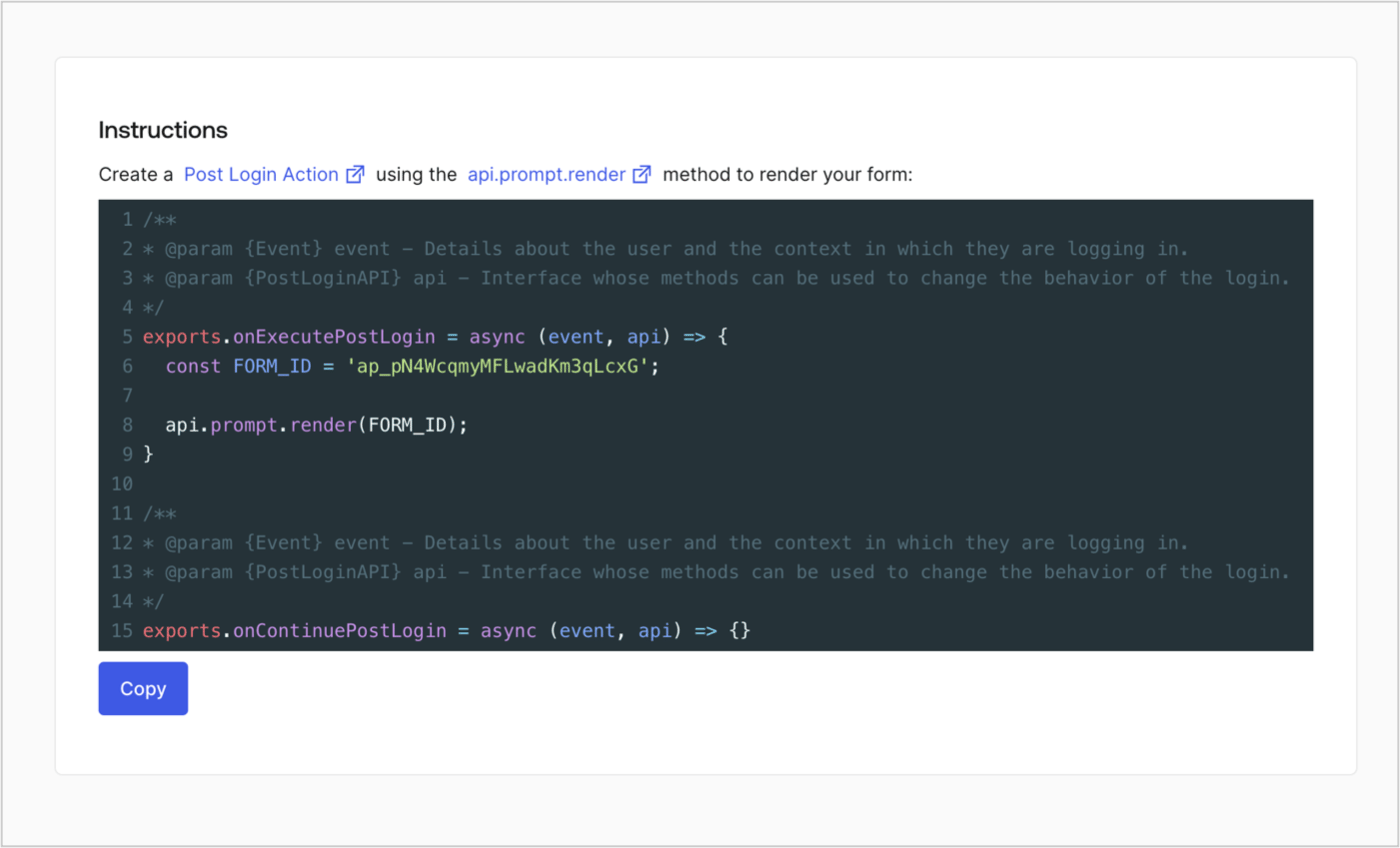
Retrieve your form render code to visually render the form with a custom Post Login Action by following these steps:

* From the Form editor, select **`<> Render`**.
* Select **Copy**.
<Frame>
  <img src="https://mintcdn.com/docs-dev-feat-member-mgmt-docs/hxBpLAB95oYG82RX/docs/images/cdy7uua7fh8z/2EIUzc539sq9lwoTKbjoJv/496a864c0fc44a782c9cadca119dbfb0/embed.png?fit=max&auto=format&n=hxBpLAB95oYG82RX&q=85&s=0f8f9ac6cc609f91a906b134f52a1a72" alt="Dashboard > Actions > Forms > Form > Embed" data-og-width="1400" width="1400" data-og-height="848" height="848" data-path="docs/images/cdy7uua7fh8z/2EIUzc539sq9lwoTKbjoJv/496a864c0fc44a782c9cadca119dbfb0/embed.png" data-optimize="true" data-opv="3" srcset="https://mintcdn.com/docs-dev-feat-member-mgmt-docs/hxBpLAB95oYG82RX/docs/images/cdy7uua7fh8z/2EIUzc539sq9lwoTKbjoJv/496a864c0fc44a782c9cadca119dbfb0/embed.png?w=280&fit=max&auto=format&n=hxBpLAB95oYG82RX&q=85&s=b5c82f58c36dcfb705e421cb327fcc30 280w, https://mintcdn.com/docs-dev-feat-member-mgmt-docs/hxBpLAB95oYG82RX/docs/images/cdy7uua7fh8z/2EIUzc539sq9lwoTKbjoJv/496a864c0fc44a782c9cadca119dbfb0/embed.png?w=560&fit=max&auto=format&n=hxBpLAB95oYG82RX&q=85&s=efc3bac6602461ff095fa2254f5c7285 560w, https://mintcdn.com/docs-dev-feat-member-mgmt-docs/hxBpLAB95oYG82RX/docs/images/cdy7uua7fh8z/2EIUzc539sq9lwoTKbjoJv/496a864c0fc44a782c9cadca119dbfb0/embed.png?w=840&fit=max&auto=format&n=hxBpLAB95oYG82RX&q=85&s=833f533d03483716709c452c48c73b4e 840w, https://mintcdn.com/docs-dev-feat-member-mgmt-docs/hxBpLAB95oYG82RX/docs/images/cdy7uua7fh8z/2EIUzc539sq9lwoTKbjoJv/496a864c0fc44a782c9cadca119dbfb0/embed.png?w=1100&fit=max&auto=format&n=hxBpLAB95oYG82RX&q=85&s=33a6da677c902fb8503aaa708068965b 1100w, https://mintcdn.com/docs-dev-feat-member-mgmt-docs/hxBpLAB95oYG82RX/docs/images/cdy7uua7fh8z/2EIUzc539sq9lwoTKbjoJv/496a864c0fc44a782c9cadca119dbfb0/embed.png?w=1650&fit=max&auto=format&n=hxBpLAB95oYG82RX&q=85&s=9be18437a99fb74bf02ff3a238a1172a 1650w, https://mintcdn.com/docs-dev-feat-member-mgmt-docs/hxBpLAB95oYG82RX/docs/images/cdy7uua7fh8z/2EIUzc539sq9lwoTKbjoJv/496a864c0fc44a782c9cadca119dbfb0/embed.png?w=2500&fit=max&auto=format&n=hxBpLAB95oYG82RX&q=85&s=7c3159cfc1b28a3112c8975fd18e468b 2500w" />
</Frame>

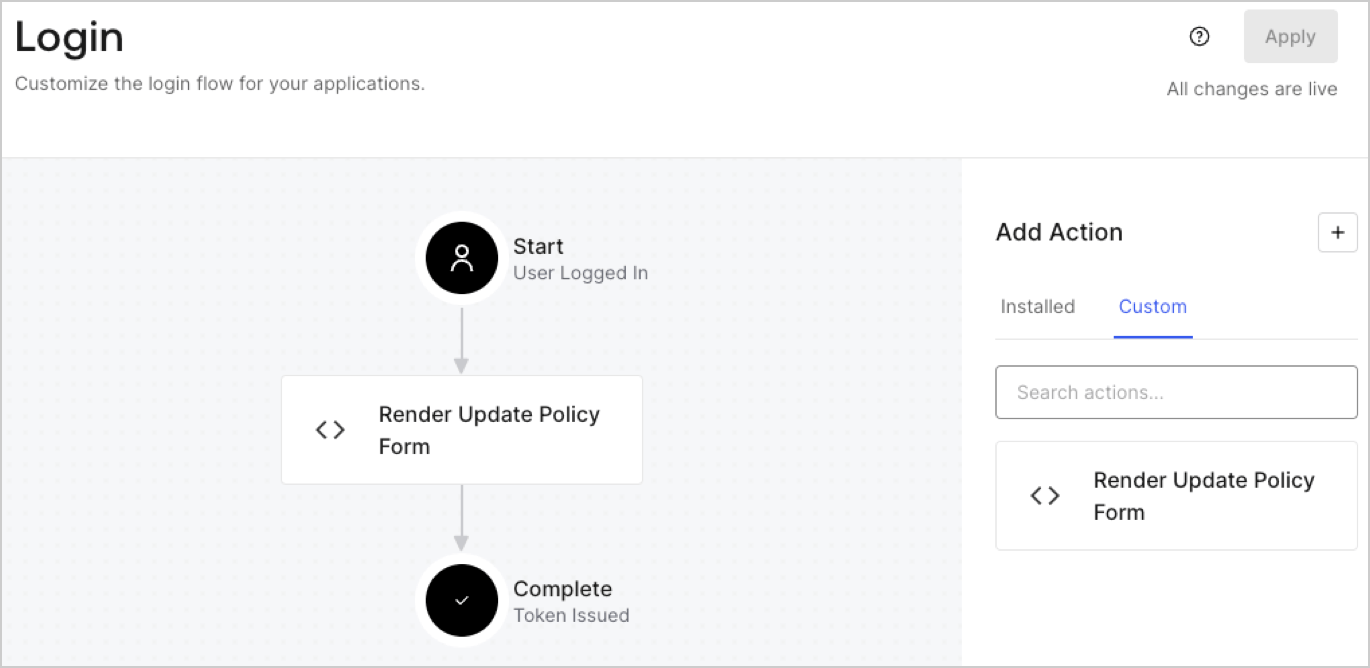
## Create a Post Login Action

Create a post-login Action to render your form by following these steps:

1. Navigate to **Auth0 Dashboard > Actions > Flows > Login.**
2. Select the **+** icon and Select **Build from scratch**:

   * **Name**: Enter `Render Update Policy Form`.
   * **Trigger**: Select `Login / Post Login`.
   * **Runtime**: Select the recommended version.
3. Select **Create**.

To configure the post-login Action:

1. Delete the existing code from the Code editor.
2. Paste the form render code into the Code editor.
3. Edit the code to define the conditional logic that will render the form.

   ```javascript lines theme={null}
   /**
   * @param {Event} event - Details about the user and the context in which they are logging in.
   * @param {PostLoginAPI} api - Interface whose methods can be used to change the behavior of the login.
   */
   exports.onExecutePostLogin = async (event, api) => {
     const FORM_ID = 'REPLACE_WITH_YOUR_FORM_ID';

     if (event.user.app_metadata.privacy_policies !== true) {
       api.prompt.render(FORM_ID);
     }
   }

   exports.onContinuePostLogin = async (event, api) => { }
   ```

   <Callout icon="file-lines" color="#0EA5E9" iconType="regular">
     The example code above will render the form when a user is missing the app metadata `privacy_policies` property.
   </Callout>
4. Select **Deploy.**
5. Drag and Drop the **Render Update Policy Form** Action to the **Login** flow.
   <Frame>
     <img src="https://mintcdn.com/docs-dev-feat-member-mgmt-docs/xEbxb6x7u1ZZ6VnF/docs/images/cdy7uua7fh8z/5TOwDgevZsBqd7yZynUYWU/41ca909dc3007aed4f40ff794a05efa5/postlogin.png?fit=max&auto=format&n=xEbxb6x7u1ZZ6VnF&q=85&s=c91ba419edcd1cd57478b5140c71cc84" alt="Dashboard > Forms > Use Case > Render update policy form login action" data-og-width="1370" width="1370" data-og-height="668" height="668" data-path="docs/images/cdy7uua7fh8z/5TOwDgevZsBqd7yZynUYWU/41ca909dc3007aed4f40ff794a05efa5/postlogin.png" data-optimize="true" data-opv="3" srcset="https://mintcdn.com/docs-dev-feat-member-mgmt-docs/xEbxb6x7u1ZZ6VnF/docs/images/cdy7uua7fh8z/5TOwDgevZsBqd7yZynUYWU/41ca909dc3007aed4f40ff794a05efa5/postlogin.png?w=280&fit=max&auto=format&n=xEbxb6x7u1ZZ6VnF&q=85&s=43045f2520c2c0c695d4745ff9b243e2 280w, https://mintcdn.com/docs-dev-feat-member-mgmt-docs/xEbxb6x7u1ZZ6VnF/docs/images/cdy7uua7fh8z/5TOwDgevZsBqd7yZynUYWU/41ca909dc3007aed4f40ff794a05efa5/postlogin.png?w=560&fit=max&auto=format&n=xEbxb6x7u1ZZ6VnF&q=85&s=a6bd777173ae98710a6c3f701c0d1bea 560w, https://mintcdn.com/docs-dev-feat-member-mgmt-docs/xEbxb6x7u1ZZ6VnF/docs/images/cdy7uua7fh8z/5TOwDgevZsBqd7yZynUYWU/41ca909dc3007aed4f40ff794a05efa5/postlogin.png?w=840&fit=max&auto=format&n=xEbxb6x7u1ZZ6VnF&q=85&s=ce4507771ca9c921b3a98be22ba09434 840w, https://mintcdn.com/docs-dev-feat-member-mgmt-docs/xEbxb6x7u1ZZ6VnF/docs/images/cdy7uua7fh8z/5TOwDgevZsBqd7yZynUYWU/41ca909dc3007aed4f40ff794a05efa5/postlogin.png?w=1100&fit=max&auto=format&n=xEbxb6x7u1ZZ6VnF&q=85&s=48724e60e78cd4b4ff470814078dbbef 1100w, https://mintcdn.com/docs-dev-feat-member-mgmt-docs/xEbxb6x7u1ZZ6VnF/docs/images/cdy7uua7fh8z/5TOwDgevZsBqd7yZynUYWU/41ca909dc3007aed4f40ff794a05efa5/postlogin.png?w=1650&fit=max&auto=format&n=xEbxb6x7u1ZZ6VnF&q=85&s=313614ad8a0a3ac03e5c47954807224d 1650w, https://mintcdn.com/docs-dev-feat-member-mgmt-docs/xEbxb6x7u1ZZ6VnF/docs/images/cdy7uua7fh8z/5TOwDgevZsBqd7yZynUYWU/41ca909dc3007aed4f40ff794a05efa5/postlogin.png?w=2500&fit=max&auto=format&n=xEbxb6x7u1ZZ6VnF&q=85&s=0e0f2d1669c23aeae8dc219140c9b55d 2500w" />
   </Frame>
6. Select **Apply.**

### Test implementation

Test the implementation by following these steps:

1. Log in with an existing user whose app`_metadata` attribute `privacy_policies` does not have a value.
2. The post-login Action in the Login flow will render the form and prompt for acceptance.
3. Select **Auth0 Dashboard > User Management > Users,** locate the user and verify that the `app_metadata` attribute `privacy_policies` contains a `true` value and a timestamp.
