> ## Documentation Index
> Fetch the complete documentation index at: https://docs-dev-feat-member-mgmt-docs.mintlify.site/llms.txt
> Use this file to discover all available pages before exploring further.
# Cas d’utilisation : Configurer un formulaire de profil progressif à l’aide des formulaires
> Apprenez à configurer un formulaire de profil progressif à l’aide de Formulaires pour actions
1. Créez une [application machine-machine](https://auth0.com/docs/get-started/auth0-overview/create-applications/machine-to-machine-apps) avec les permissions suivantes activées :
* `read:users`
* `update:users`
* `create:users`
* `read:users_app_metadata`
* `update:users_app_metadata`
* `create:users_app_metadata`
2. Ajoutez une [Connexion au coffre-fort](/docs/fr-ca/customize/forms/vault) en utilisant les informations d’identification de l’application machine-machine (M-M).
Les formulaires pour les actions vous permettent de créer des flux de profilage progressif pour décider quand inviter les utilisateurs à fournir des informations manquantes, telles que le nom de l’entreprise et le poste, et de les stocker en tant qu’attributs `user_metadata`.
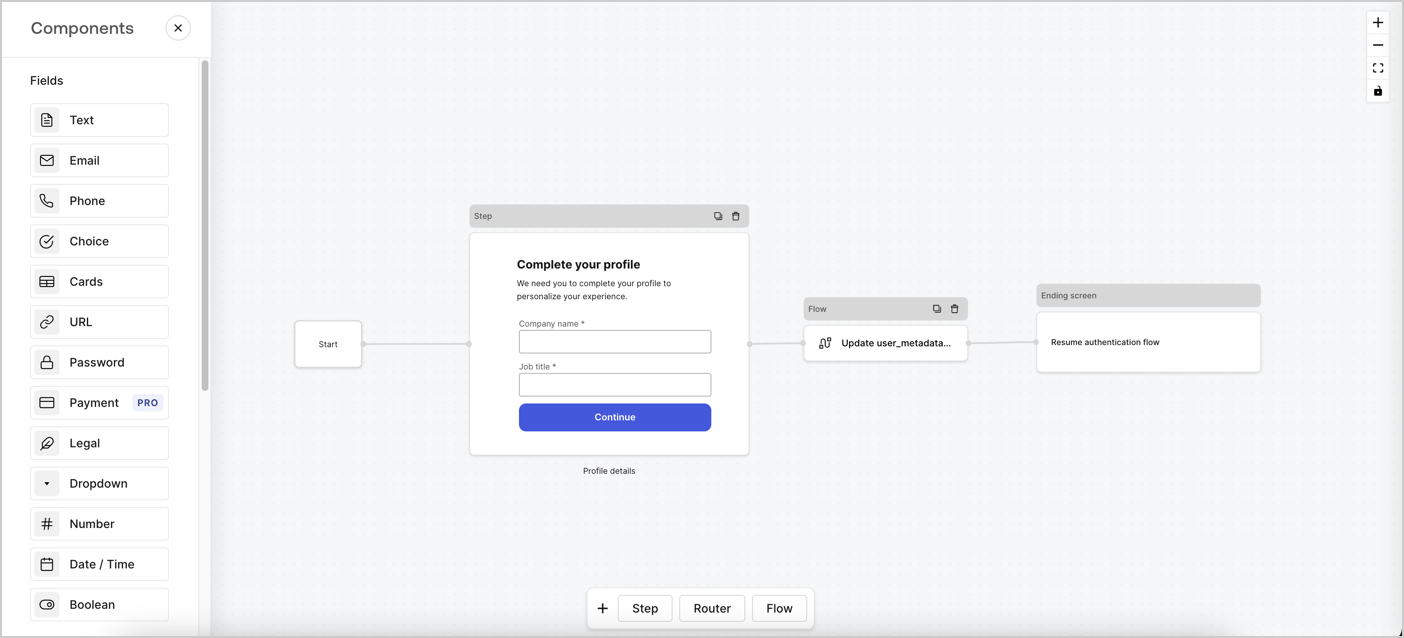 Les sections ci-dessous décrivent comment créer un Formulaire de profil progressif en utilisant des nœuds et des flux, ainsi que les étapes pour ajouter votre formulaire à une action [post-connexion](/docs/fr-ca/customize/actions/explore-triggers/signup-and-login-triggers/login-trigger).
## Créer un formulaire à partir de zéro
Suivez ces étapes pour créer un formulaire afin de recueillir des informations :
1. Ouvrez l’éditeur de formulaires en sélectionnant **Auth0 Dashboard (tableau de bord Auth0) > Actions > Forms (formulaires).**
2. Sélectionnez **Créer un formulaire** > **Commencer à partir de zéro**.
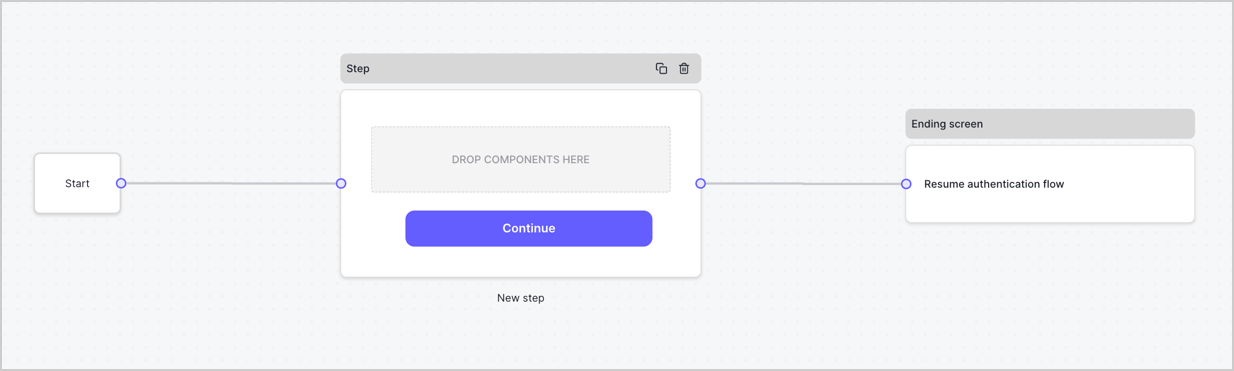
Par défaut, un nouveau formulaire contient un nœud Début, un nœud Étape et un nœud Éran fin.
Les sections ci-dessous décrivent comment créer un Formulaire de profil progressif en utilisant des nœuds et des flux, ainsi que les étapes pour ajouter votre formulaire à une action [post-connexion](/docs/fr-ca/customize/actions/explore-triggers/signup-and-login-triggers/login-trigger).
## Créer un formulaire à partir de zéro
Suivez ces étapes pour créer un formulaire afin de recueillir des informations :
1. Ouvrez l’éditeur de formulaires en sélectionnant **Auth0 Dashboard (tableau de bord Auth0) > Actions > Forms (formulaires).**
2. Sélectionnez **Créer un formulaire** > **Commencer à partir de zéro**.
Par défaut, un nouveau formulaire contient un nœud Début, un nœud Étape et un nœud Éran fin.
 ### Configurer le nœud d’étape
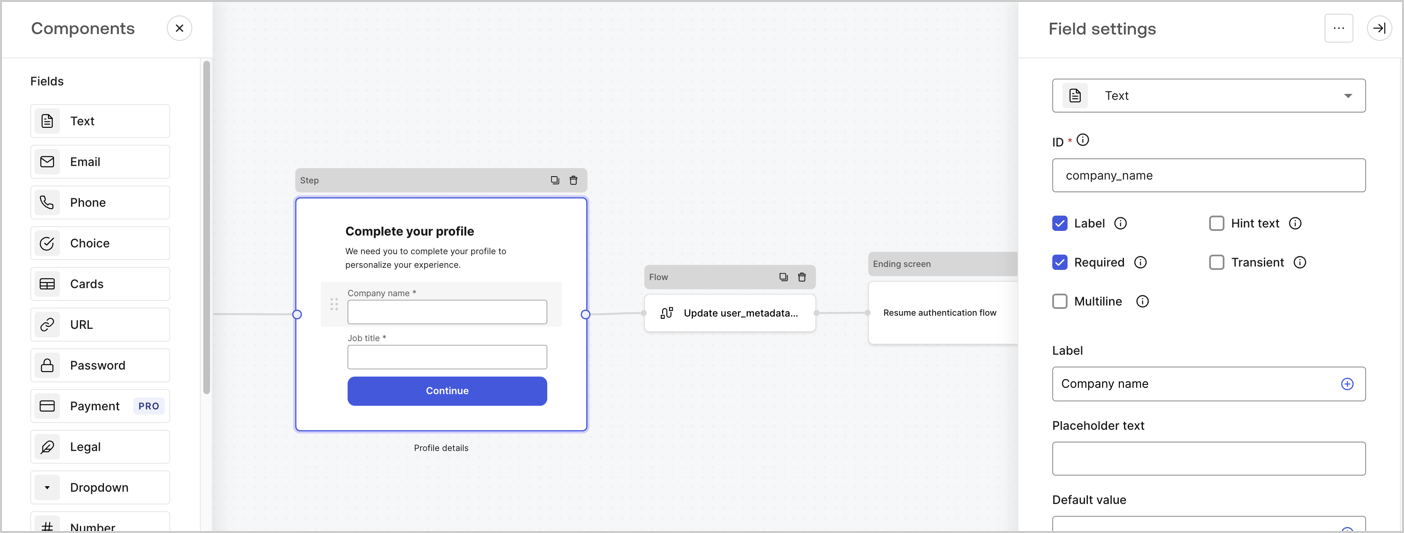
Le nœud d’étape est l’interface graphique présentée aux utilisateurs. Ajoutez des [Champs](/docs/fr-ca/customize/forms/nodes-and-components) au nœud d’étape pour obtenir le nom de l’entreprise de l’utilisateur et les valeurs d’intitulé de son poste en procédant comme suit :
1. Faites glisser un champ **Rich text (Texte enrichi)** depuis le **Components menu (Menu composants)** dans le nœud **d’étape**.
* **Rich text (Texte enrichi)** : saisissez un message personnalisé.
* **Exemple** : `Complétez votre profil! Nous avons besoin que vous complétiez votre profil pour personnaliser votre expérience.`
* Sélectionnez **Save (Enregistrer)**.
2. Faites glisser un champ **Text (Texte)** dans le nœud **Step (Étape)**.
* **ID** : Saisissez `company_name`.
* **Label (Étiquette)** : activez la case à cocher.
* **Label (Étiquette)** : Saisissez `Company name`.
* **Required (Requis)** : activez la case à cocher.
* Sélectionnez **Save (Enregistrer)**.
3. Faites glisser un champ **Text (Texte)** dans le nœud **Step (Étape)**.
1. **ID** : saisissez `job_title`.
2. **Label (Étiquette)** : Saisissez `Job title`.
3. **Label (Étiquette)** : activez la case à cocher.
4. **Required (Requis)** : activez la case à cocher.
5. Sélectionnez **Save (Enregistrer)**.
4. Sélectionnez **Publish (Publier)** pour enregistrer.
### Configurer le nœud d’étape
Le nœud d’étape est l’interface graphique présentée aux utilisateurs. Ajoutez des [Champs](/docs/fr-ca/customize/forms/nodes-and-components) au nœud d’étape pour obtenir le nom de l’entreprise de l’utilisateur et les valeurs d’intitulé de son poste en procédant comme suit :
1. Faites glisser un champ **Rich text (Texte enrichi)** depuis le **Components menu (Menu composants)** dans le nœud **d’étape**.
* **Rich text (Texte enrichi)** : saisissez un message personnalisé.
* **Exemple** : `Complétez votre profil! Nous avons besoin que vous complétiez votre profil pour personnaliser votre expérience.`
* Sélectionnez **Save (Enregistrer)**.
2. Faites glisser un champ **Text (Texte)** dans le nœud **Step (Étape)**.
* **ID** : Saisissez `company_name`.
* **Label (Étiquette)** : activez la case à cocher.
* **Label (Étiquette)** : Saisissez `Company name`.
* **Required (Requis)** : activez la case à cocher.
* Sélectionnez **Save (Enregistrer)**.
3. Faites glisser un champ **Text (Texte)** dans le nœud **Step (Étape)**.
1. **ID** : saisissez `job_title`.
2. **Label (Étiquette)** : Saisissez `Job title`.
3. **Label (Étiquette)** : activez la case à cocher.
4. **Required (Requis)** : activez la case à cocher.
5. Sélectionnez **Save (Enregistrer)**.
4. Sélectionnez **Publish (Publier)** pour enregistrer.
 ### Configurer le nœud Flow (Flux)
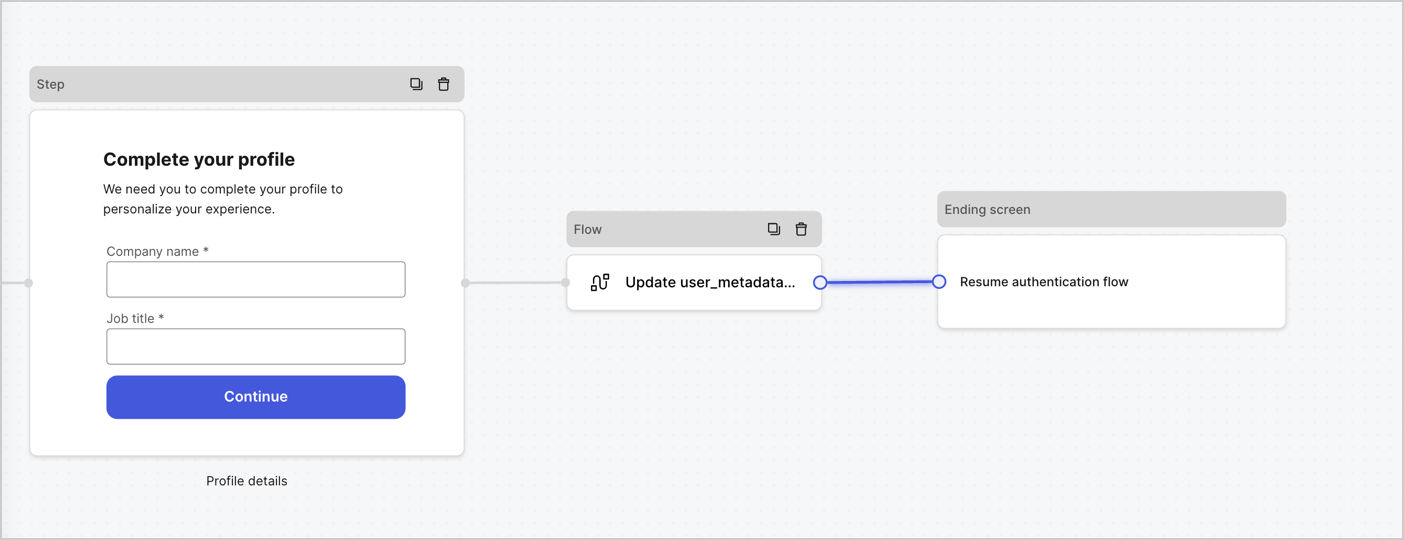
Ajoutez un nœud **Flow (Flux)** après le nœud **Step (Étape)** pour mettre à jour les `user_metadata` et reprenez le flux d’authentification en procédant comme suit :
1. Sélectionnez **Flow (Flux)** en bas de Form Editor (Éditeur de formulaire).
2. Supprimez le lien existant entre les nœuds **Step (Étape)** et **Ending Screen (Écran de fin)**.
3. Sélectionnez le nouveau **Flow (Flux)** > **Click to add a flow (Cliquer pour ajouter un flux)** > **Create a new flow (Créer un nouveau flux).**
* Saisissez `Update user_metadata (Mettre à jour user_metadata)` dans le champ **Name (Nom)**.
* Sélectionnez **Create (Créer)**.
* Sélectionnez **Save (Enregistrer)**.
4. Liez le nœud **Flow (Flux)** aux nœuds **Step (Étape)** et **Ending Screen (Écran de fin)** comme illustré ci-dessous.
5. Sélectionnez **Publish (Publier)** pour enregistrer.
### Configurer le nœud Flow (Flux)
Ajoutez un nœud **Flow (Flux)** après le nœud **Step (Étape)** pour mettre à jour les `user_metadata` et reprenez le flux d’authentification en procédant comme suit :
1. Sélectionnez **Flow (Flux)** en bas de Form Editor (Éditeur de formulaire).
2. Supprimez le lien existant entre les nœuds **Step (Étape)** et **Ending Screen (Écran de fin)**.
3. Sélectionnez le nouveau **Flow (Flux)** > **Click to add a flow (Cliquer pour ajouter un flux)** > **Create a new flow (Créer un nouveau flux).**
* Saisissez `Update user_metadata (Mettre à jour user_metadata)` dans le champ **Name (Nom)**.
* Sélectionnez **Create (Créer)**.
* Sélectionnez **Save (Enregistrer)**.
4. Liez le nœud **Flow (Flux)** aux nœuds **Step (Étape)** et **Ending Screen (Écran de fin)** comme illustré ci-dessous.
5. Sélectionnez **Publish (Publier)** pour enregistrer.
 Ajoutez une action de mise à jour d’utilisateur Auth0 au flux en suivant ces étapes :
1. Sélectionnez le flux **Update user\_metadata** puis sélectionnez **Edit Flow (Modifier le flux)** pour ouvrir l’éditeur de flux dans un nouvel onglet.
2. Sous l’action **Start (Démarrage)** , sélectionnez l’icône **+** pour ajouter une action **Update user (Mise à jour de l’utilisateur)**. Remplissez les champs ci-dessous, puis sélectionnez **Save (Enregistrer)** pour continuer.
* **Connection** : dans la liste déroulante, sélectionnez la connexion au coffre-fort de votre application de communication entre machines.
* **User ID** (ID utilisateur) : Saisissez `{{context.user.user_id}}`.
* **Body (Corps)** : Copiez et collez le code suivant pour mettre à jour user\_metadata avec les propriétés `job_title` et `company_name`.
```
{
"user_metadata": {
"job_title": "{{fields.job_title}}",
"company_name": "{{fields.company_name}}"
}
}
```
* Sélectionnez **Save (Enregistrer)**.
3. Sélectionnez **Publish (Publier)** pour enregistrer.
Ajoutez une action de mise à jour d’utilisateur Auth0 au flux en suivant ces étapes :
1. Sélectionnez le flux **Update user\_metadata** puis sélectionnez **Edit Flow (Modifier le flux)** pour ouvrir l’éditeur de flux dans un nouvel onglet.
2. Sous l’action **Start (Démarrage)** , sélectionnez l’icône **+** pour ajouter une action **Update user (Mise à jour de l’utilisateur)**. Remplissez les champs ci-dessous, puis sélectionnez **Save (Enregistrer)** pour continuer.
* **Connection** : dans la liste déroulante, sélectionnez la connexion au coffre-fort de votre application de communication entre machines.
* **User ID** (ID utilisateur) : Saisissez `{{context.user.user_id}}`.
* **Body (Corps)** : Copiez et collez le code suivant pour mettre à jour user\_metadata avec les propriétés `job_title` et `company_name`.
```
{
"user_metadata": {
"job_title": "{{fields.job_title}}",
"company_name": "{{fields.company_name}}"
}
}
```
* Sélectionnez **Save (Enregistrer)**.
3. Sélectionnez **Publish (Publier)** pour enregistrer.
 ### Récupérer le code de rendu du formulaire
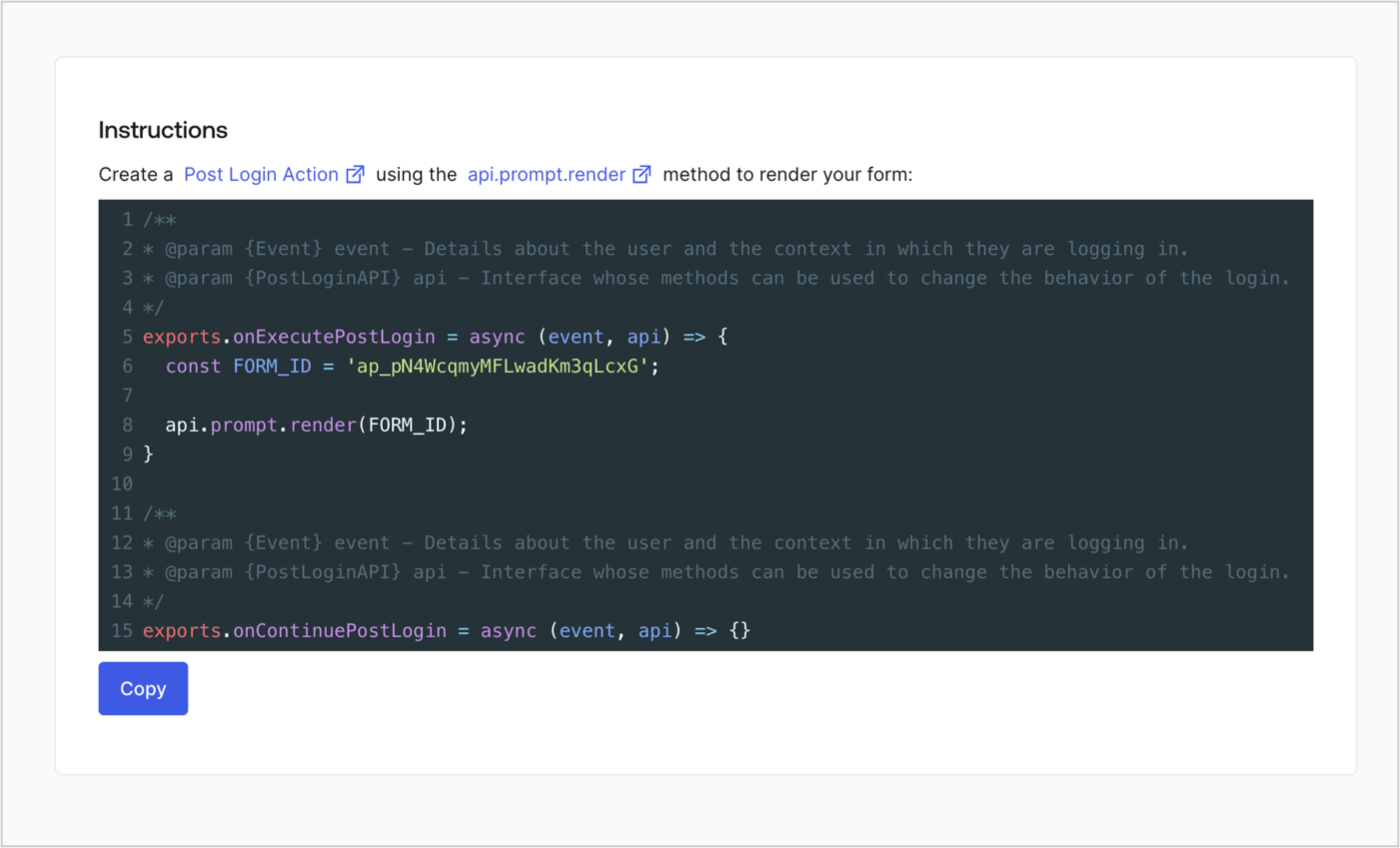
Récupérez le code de rendu du formulaire pour afficher visuellement le formulaire avec une Action post-connexion personnalisée en suivant ces étapes :
* Dans l’éditeur de formulaires, sélectionnez **\<> Render (Rendre)**.
* Sélectionnez **Copy (Copier)**.
### Récupérer le code de rendu du formulaire
Récupérez le code de rendu du formulaire pour afficher visuellement le formulaire avec une Action post-connexion personnalisée en suivant ces étapes :
* Dans l’éditeur de formulaires, sélectionnez **\<> Render (Rendre)**.
* Sélectionnez **Copy (Copier)**.
 ## Créer une action post-connexion
Créez une action post-connexion pour afficher votre formulaire en suivant ces étapes :
1. Rendez-vous à **Auth0 Dashboard > Actions > Flows (Flux) > Login (Connexion).**
2. Sélectionnez l’icône **+**, puis **Build from scratch (Créer de A à Z)** :
* **Name (Nom)** : Saisissez `Render Progressive Profile Form (Rendre le formulaire de profil progressif)`.
* **Trigger (Déclencheur)** : sélectionnez `Login / Post Login`.
* **Runtime (Temps d’exécution)** : sélectionnez la version recommandée.
3. Sélectionnez **Create (Créer)**.
Pour configurer l’action post-connexion :
1. Supprimez le code existant dans l’éditeur de code.
2. Collez le code d’intégration du formulaire dans l’éditeur de code.
3. Modifiez le code pour définir la logique conditionnelle d’affichage du formulaire.
```javascript lines theme={null}
/**
* @param {Event} event - Details about the user and the context in which they are logging in.
* @param {PostLoginAPI} api - Interface whose methods can be used to change the behavior of the login.
*/
exports.onExecutePostLogin = async (event, api) => {
const FORM_ID = 'REPLACE_WITH_YOUR_FORM_ID';
if (
event.stats.logins_count > 2 &&
!event.user.user_metadata.company_name &&
!event.user.user_metadata.job_title
) {
api.prompt.render(FORM_ID);
}
}
exports.onContinuePostLogin = async (event, api) => { }
```
L’exemple de code ci-dessus affiche le formulaire lorsqu’un utilisateur a un nombre de connexions supérieur à 2 et que les propriétés company\_name et job\_title des métadonnées de l’utilisateur sont manquantes.
4. Sélectionnez **Deploy (Déployer)**.
5. Glissez et déposez l’Action **Render Progressive Profile Form (Rendre le formulaire de profil progressif)** dans le flux **Login (Connexion)**.
## Créer une action post-connexion
Créez une action post-connexion pour afficher votre formulaire en suivant ces étapes :
1. Rendez-vous à **Auth0 Dashboard > Actions > Flows (Flux) > Login (Connexion).**
2. Sélectionnez l’icône **+**, puis **Build from scratch (Créer de A à Z)** :
* **Name (Nom)** : Saisissez `Render Progressive Profile Form (Rendre le formulaire de profil progressif)`.
* **Trigger (Déclencheur)** : sélectionnez `Login / Post Login`.
* **Runtime (Temps d’exécution)** : sélectionnez la version recommandée.
3. Sélectionnez **Create (Créer)**.
Pour configurer l’action post-connexion :
1. Supprimez le code existant dans l’éditeur de code.
2. Collez le code d’intégration du formulaire dans l’éditeur de code.
3. Modifiez le code pour définir la logique conditionnelle d’affichage du formulaire.
```javascript lines theme={null}
/**
* @param {Event} event - Details about the user and the context in which they are logging in.
* @param {PostLoginAPI} api - Interface whose methods can be used to change the behavior of the login.
*/
exports.onExecutePostLogin = async (event, api) => {
const FORM_ID = 'REPLACE_WITH_YOUR_FORM_ID';
if (
event.stats.logins_count > 2 &&
!event.user.user_metadata.company_name &&
!event.user.user_metadata.job_title
) {
api.prompt.render(FORM_ID);
}
}
exports.onContinuePostLogin = async (event, api) => { }
```
L’exemple de code ci-dessus affiche le formulaire lorsqu’un utilisateur a un nombre de connexions supérieur à 2 et que les propriétés company\_name et job\_title des métadonnées de l’utilisateur sont manquantes.
4. Sélectionnez **Deploy (Déployer)**.
5. Glissez et déposez l’Action **Render Progressive Profile Form (Rendre le formulaire de profil progressif)** dans le flux **Login (Connexion)**.
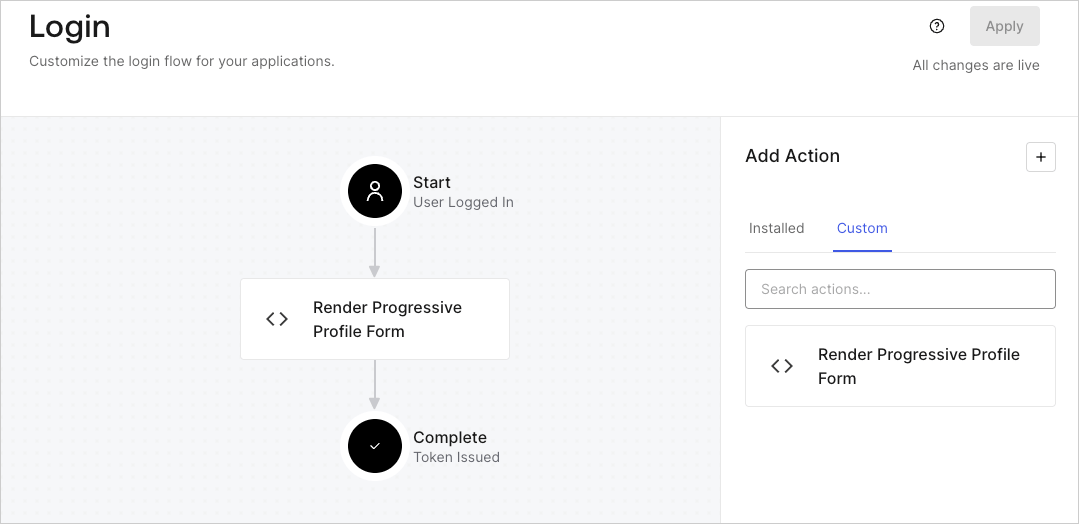 6. Sélectionnez **Apply (Appliquer)**.
### Tester la mise en œuvre
Testez la mise en œuvre en procédant comme suit :
1. Se connecter avec un utilisateur existant dont le nombre de connexions est supérieur à 2 et dont les attributs `user_metadata` `company_name` et `job_title` n’ont pas de valeurs.
2. L’action post-connexion dans le flux de connexion affichera le formulaire et demandera des informations.
3. Sélectionnez **Auth0 Dashboard > User Management (Gestion des utilisateurs) > Users (Utilisateurs),** localisez l’utilisateur et vérifiez que les attributs `user_metadata` `company_name` et `job_title` contiennent des informations.
6. Sélectionnez **Apply (Appliquer)**.
### Tester la mise en œuvre
Testez la mise en œuvre en procédant comme suit :
1. Se connecter avec un utilisateur existant dont le nombre de connexions est supérieur à 2 et dont les attributs `user_metadata` `company_name` et `job_title` n’ont pas de valeurs.
2. L’action post-connexion dans le flux de connexion affichera le formulaire et demandera des informations.
3. Sélectionnez **Auth0 Dashboard > User Management (Gestion des utilisateurs) > Users (Utilisateurs),** localisez l’utilisateur et vérifiez que les attributs `user_metadata` `company_name` et `job_title` contiennent des informations.